
Enhancing Chat GPT Website with Group Chat Functionality
Project Summary
This project aimed to enhance the Chat GPT website by introducing group chat functionality for collaborative conversations. By addressing the growing demand for collaborative communication and leveraging the power of AI, the redesigned website successfully enabled users to create and engage in group chats, fostering seamless collaboration and improving the overall user experience.
Role
Tools
Project Duration
-
Creating User Flow and Information Architecture
-
Prototyping and Testing
-
UI/UX Designing
-
Figma
-
FigJam
-
April 12th - May 28th
-
Total: 46 days
Problems
The current design of the Chat GPT website lacks group chat functionality, which hinders collaborative communication among users. This restricts users from engaging in group conversations and limits their ability to leverage the AI capabilities of Chat GPT for collaborative support. Additionally, the absence of group chat features poses a business challenge as it restricts the platform's potential to attract and retain users seeking collaborative communication solutions.

Goals
User Goals:
-
Enable users to easily create and participate in group chats for collaborative conversations.
-
Foster seamless communication and interaction among group members.
-
Leverage Chat GPT AI capabilities to enhance group conversations and provide valuable insights.
Product Goals:
-
Implement group chat functionality within the Chat GPT website to cater to the growing demand for collaborative communication.
-
Enhance the user experience by providing intuitive and efficient features for group conversations.
-
Establish Chat GPT as a versatile platform capable of supporting both one-on-one and group interactions.
Features List


I will list the user requirements, and then I will identify and list the corresponding features that match the user's needs.
Research


In terms of research, I consulted websites such as Behance, Dribbble, Pinterest,... to gather design inspiration. I came across an app called Brainwave, which retains the characteristics of Chat GPT. Additionally, I want the group management aspect to resemble the design of Messenger. The design styles I aim for are modern and minimalist.
Information Architecture

Based on the feature list, I will proceed to create an information architecture to establish a specific direction for the users.
User Flow
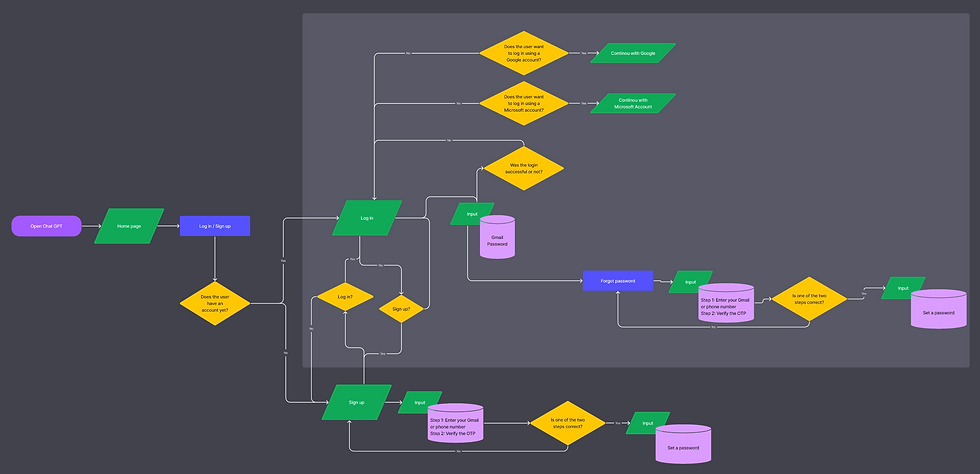


I have created this User Flow based on the Information Architecture, aiming to explicitly outline each scenario for every user action.
Wireframe/Prototype


To make the Wireframe/Prototype, I use Figma to create and test it. Throughout the process, I always refer to online sources such as Behance, Dribbble, Pinterest, and even the Figma community. These reference sources have been helpful to me throughout the design process.
Interface Design

(L) Current product page; (R) Redesign
By adding images to enhance the visual appeal of the homepage and including captions below to highlight the benefits of Chat GPT.

(L) Current product page; (R) Redesign
The elements are still retained from the previous version, but there are adjustments in terms of color, as well as the addition of images. The color scheme here is oriented towards dark and neutral tones.

(L) Current product page; (R) Redesign
The working areas are still kept the same as in the original version, but in addition, there is an area for group management. Along with that is the redesign of the interface for each area and the addition of some new features.

Each area is clearly divided

(L) Dark mode; (R) Light mode

The functions of each area

(L) Dark mode; (R) Light mode

(L) Dark mode; (R) Light mode
The left navigation bar when it is in small size
Conclusion
The introduction of group chat has resulted in increased user engagement, attracting new users and expanding the platform's user base. Users have expressed satisfaction with the user-friendly interface, intuitive features, and the ability to leverage Chat GPT AI in group conversations. The redesign has fostered seamless collaboration and improved productivity among users.
Overall, the redesign of the Chat GPT website with the group chat feature has successfully addressed user needs, enhanced collaboration, and positioned the platform for growth and increased user satisfaction. By leveraging the power of AI in group conversations, Chat GPT has become a more comprehensive and valuable tool for collaborative communication.